
Motherboard: Definition
Introduction to the Computer Motherboard
The computer motherboard is the backbone of any computer system. Every major component, including the processor, memory, storage devices, and expansion cards, connects directly or indirectly to the motherboard. Without it, a computer cannot function.
In modern computing, motherboards are designed to support high-speed processors, advanced graphics, faster memory, and multiple storage devices. Whether you are building a gaming PC, office computer, or server, selecting the right motherboard is crucial for performance, stability, and future upgrades.
What is a Computer Motherboard?
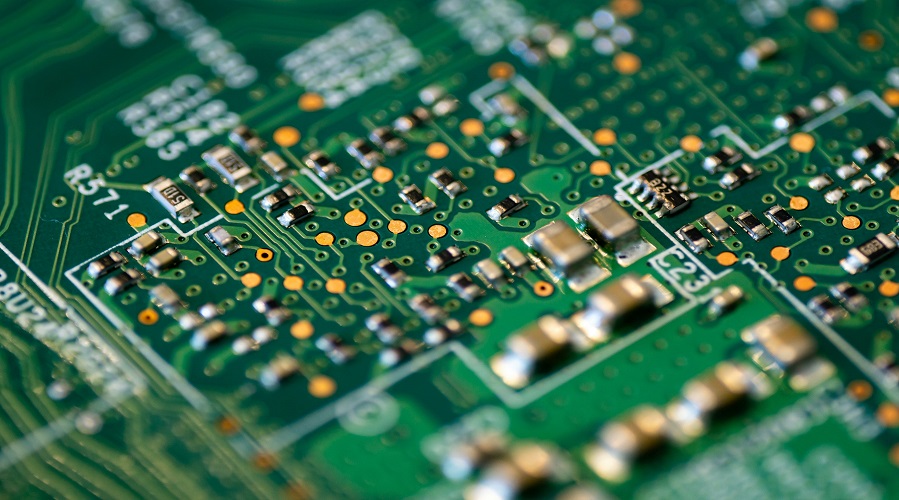
A computer motherboard is the main printed circuit board (PCB) inside a computer that connects and allows communication between all hardware components. It distributes power, manages data flow, and provides connectors for internal and external devices.
Simple Definition:
A motherboard is the central hub that connects the CPU, RAM, storage devices, and peripherals, enabling them to work together as a complete computer system.
History and Evolution of the Motherboard
In early computers, components were connected using individual circuit boards. With technological advancement, manufacturers integrated all components into a single board known as the motherboard.
Evolution Timeline:
- 1980s: Basic system boards with limited expansion
- 1990s: Introduction of AT and ATX motherboards
- 2000s: Integrated audio, video, and network controllers
- 2010s–Present: High-speed interfaces, compact designs, RGB support
Importance of the Motherboard in a Computer
The motherboard determines:
- System compatibility
- Maximum performance potential
- Upgrade options
- Overall system stability
A high-quality motherboard ensures efficient communication between components and long-term reliability.
Main Functions of a Motherboard
- Connects all hardware components
- Supplies power to components
- Enables data communication
- Supports expansion and upgrades
- Houses firmware like BIOS/UEFI
Components of a Motherboard
Major Motherboard Components:
Each component plays a vital role in system operation.
7. Motherboard Chipset Explained
The chipset acts as a traffic controller, managing communication between the CPU, memory, storage, and peripherals.
Types of Chipsets:
- Intel Chipsets (Z, B, H series)
- AMD Chipsets (X, B, A series)
Higher-end chipsets support overclocking, more PCIe lanes, and advanced features.
BIOS and UEFI Firmware
BIOS (Basic Input Output System) and UEFI (Unified Extensible Firmware Interface) initialize hardware during boot and load the operating system.
Key Functions:
- Hardware initialization
- Boot sequence management
- System configuration
UEFI is faster, more secure, and supports modern hardware.
Types of Motherboards
Based on Usage:
- Desktop Motherboards
- Laptop Motherboards
- Server Motherboards
- Industrial Motherboards
Each type is designed for specific performance and reliability needs.
Motherboard Form Factors
Form factor defines the size and layout of a motherboard.
Common Form Factors:
- ATX
- Micro-ATX
- Mini-ITX
- Extended ATX (E-ATX)
Choosing the correct form factor ensures compatibility with the computer case.
CPU Socket and Compatibility
The CPU socket determines which processors the motherboard can support.
Popular CPU Sockets:
- Intel LGA Series
- AMD AM Series
Always ensure CPU and motherboard compatibility before purchase.
RAM Slots and Memory Support
Motherboards contain DIMM slots for installing RAM.
Key Memory Features:
- DDR generation support
- Maximum RAM capacity
- Dual-channel or quad-channel support
Expansion Slots (PCIe)
PCIe slots allow installation of graphics cards, sound cards, and network cards.
Types:
- PCIe x16
- PCIe x4
- PCIe x1
Storage Connectors
Motherboards support multiple storage interfaces:
- SATA
- M.2
- NVMe
Modern boards support high-speed SSDs for faster performance.
Power Connectors
Power connectors supply electricity to the motherboard and CPU.
Common Connectors:
- 24-pin ATX connector
- 8-pin CPU connector
Input/Output Ports
I/O ports allow connection of external devices.
Common Ports:
- USB
- HDMI
- Ethernet
- Audio jacks
Onboard Components
Modern motherboards include:
- Audio controller
- Network controller
- Wi-Fi and Bluetooth
Cooling and Thermal Management
Motherboards support cooling through:
- Fan headers
- Heatsinks
- Temperature sensors
Proper cooling ensures system stability.
Motherboard for Gaming PCs
Gaming motherboards support:
- High-end GPUs
- Overclocking
- RGB lighting
- Fast storage
Motherboard for Office and Home Use
Office motherboards focus on:
- Reliability
- Energy efficiency
- Basic connectivity
Motherboard for Servers and Workstations
Server motherboards support:
- Multiple CPUs
- ECC memory
- High reliability
How to Choose the Right Motherboard
Key Factors:
- CPU compatibility
- Form factor
- RAM support
- Expansion needs
- Budget
Advantages and Disadvantages of Motherboard
Advantages:
- Centralized control
- Expandability
- Component integration
Disadvantages:
- Difficult repairs
- Compatibility limitations
Common Motherboard Problems and Troubleshooting
- System not booting
- Beep codes
- USB ports not working
Basic troubleshooting can resolve many issues.
Future Trends in Motherboard Technology
- Faster PCIe standards
- Improved power efficiency
- Better AI and IoT support
Q1. What is a motherboard in a computer?
A motherboard is the main circuit board that connects and controls all components.
Q2. Can a computer work without a motherboard?
No, the motherboard is essential for computer operation.
Q3. How long does a motherboard last?
Typically, 5–10 years with proper usage.
Q4. What are the main types of motherboards?
ATX, Micro-ATX, Mini-ITX, and server motherboards.
Q5. How do I know which motherboard is compatible with my CPU?
Check the CPU socket and chipset specifications.
Conclusion
The computer motherboard is the foundation of any computer system. It determines performance, compatibility, and upgrade potential. By understanding motherboard components, types, and features, users can make informed decisions when building or upgrading a computer. As technology evolves, motherboards will continue to support faster, smarter, and more efficient computing systems.
Leave a Comment
Your email address will not be published. Required fields are marked *
Related Post
Git & GitHub Version Control Tutorial for Beginners
Learn Git & GitHub Version Control with this complete beginner-to-advanced guide. Understand Git commands, repositories, branching, merging,
CI/CD Pipelines Complete Guide – Continuous Integration
Learn everything about CI/CD Pipelines in this complete guide. Understand Continuous Integration, Continuous Deployment.
DevOps: Ultimate Guide to DevOps Practices, Tools
Explore the complete DevOps guide for 2026. Learn DevOps practices, tools, benefits, CI/CD pipelines, automation, culture, and more.
What is Cloud Platforms? Types, Benefits
Learn everything about Cloud Platforms. Understand cloud computing platforms, types, benefits, services, use cases, security, and future trends.
Encryption: Types, Algorithms, Security and Data Encryption
Learn everything about Encryption in this complete guide. Understand what encryption is, types of encryption, algorithms, advantages, data security.
Ethical Hacking: Complete Guide, Tools, Techniques
Learn Ethical Hacking in this complete guide. Understand ethical hackers, types, tools, techniques, and cybersecurity best practices.
Network Security and Firewalls – Types, Architecture
Learn Network Security & Firewalls in detail. This complete guide covers concepts, types of firewalls, architecture, security threats, and more.
Network Routing and Switching – Types, Protocols & Working
Learn everything about Network Routing and Switching. Understand concepts, types, protocols, devices, differences, advantages, and more.
IP Addressing - IPv4, IPv6, Working, Types, Structure, Security
Internet Protocol (IP) is the foundation of the internet. Learn everything about IP, including IPv4, IPv6, IP addressing, packet delivery, and more.
Transmission Control Protocol (TCP) - Working, Features, Use
Learn everything about Transmission Control Protocol (TCP) in this complete SEO-friendly guide. Understand TCP definition, and more.