
DevOps
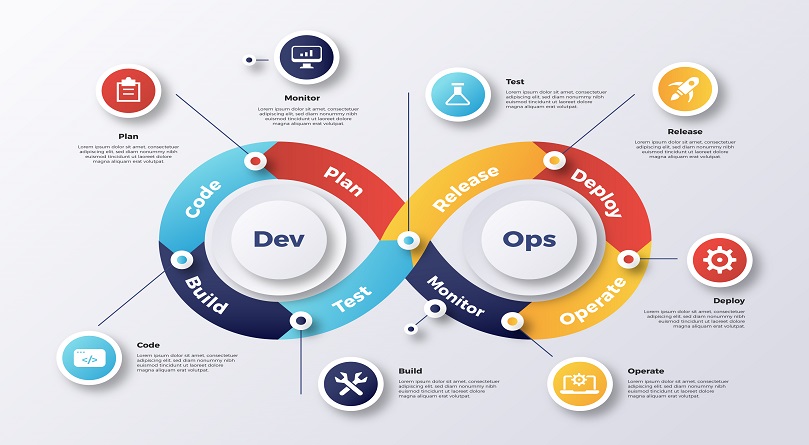
In today’s fast-paced software development environment, delivering high-quality applications quickly is essential for business success. This is where DevOps comes into play. DevOps is more than just a buzzword; it is a culture, methodology, and set of practices designed to improve collaboration between software development (Dev) and IT operations (Ops) teams.
By adopting DevOps, organizations can accelerate software delivery, reduce errors, improve reliability, and increase customer satisfaction. This article provides a comprehensive guide to DevOps, including its principles, benefits, practices, tools, and real-world applications.
What is DevOps?
DevOps is a combination of development (Dev) and operations (Ops). It represents a collaborative approach that brings together software development, IT operations, and quality assurance to ensure continuous delivery of high-quality software.
Key aspects of DevOps:
- Collaboration: Breaking down silos between Dev and Ops teams.
- Automation: Reducing manual processes for efficiency.
- Continuous Delivery: Delivering software updates frequently and reliably.
- Monitoring: Continuous monitoring of applications and infrastructure.
Highlighted Concept: DevOps is not just about tools—it’s a cultural shift towards better collaboration and faster software delivery.
Importance of DevOps
The adoption of DevOps offers multiple advantages for organizations:
- Faster Time to Market: Continuous integration and delivery pipelines allow teams to release software updates faster.
- Improved Collaboration: Development, operations, and QA teams work together, reducing misunderstandings.
- High-Quality Software: Automated testing and monitoring minimize errors and improve performance.
- Increased Customer Satisfaction: Faster delivery and quick bug fixes enhance user experience.
- Scalability: DevOps practices enable seamless scaling of applications and infrastructure.
Key Principles of DevOps
To implement DevOps successfully, organizations need to focus on several key principles:
- Continuous Integration (CI): Developers frequently merge code into a central repository, and automated builds/tests are run.
- Continuous Delivery (CD): Software is automatically deployed to testing or production environments.
- Infrastructure as Code (IaC): Infrastructure is managed and provisioned through code, improving consistency.
- Automation: Repetitive tasks, including testing, deployment, and monitoring, are automated.
- Collaboration and Communication: DevOps encourages active collaboration across teams.
- Monitoring and Feedback: Continuous monitoring provides insights for improvements.
Continuous Integration (CI): The Ultimate Guide for 2026
Introduction
In modern software development, speed and quality are key. Organizations are under constant pressure to deliver software updates faster while maintaining high standards. Continuous Integration (CI) is a core DevOps practice that addresses these challenges by automating code integration, testing, and build processes.
CI allows development teams to merge code frequently, detect errors early, and deploy software faster, reducing the time between writing code and delivering it to production. This comprehensive guide explains everything about CI, including its definition, principles, tools, best practices, workflow, benefits, challenges, and trends in 2026.
Highlighted Concept: Continuous Integration is not just a tool or process; it’s a cultural and technical practice that improves collaboration, software quality, and delivery speed.
What is Continuous Integration (CI)?
Continuous Integration (CI) is the practice of automatically integrating code changes from multiple developers into a shared repository frequently. The main goal is to detect and resolve conflicts and errors early in the development lifecycle.
Key aspects of CI:
- Frequent Code Integration: Developers merge code multiple times a day.
- Automated Builds: Each integration triggers an automated build process.
- Automated Testing: Tests are run automatically to verify that new changes don’t break existing functionality.
- Immediate Feedback: Developers receive instant feedback about the success or failure of builds and tests.
Highlighted Concept: CI ensures that software is always in a deployable state, reducing integration issues and production errors.
Importance of Continuous Integration
Implementing CI provides numerous advantages for organizations:
- Early Detection of Errors: Bugs and conflicts are caught early in the development cycle.
- Faster Delivery: Automated builds and tests accelerate the development process.
- Improved Collaboration: CI encourages frequent communication among developers.
- Reduced Risk: Regular integration minimizes the chance of large-scale integration issues.
- Higher Quality Software: Automated testing ensures consistent code quality.
- Enhanced Productivity: Developers spend less time debugging integration problems.
Highlighted Concept: CI transforms software development from a slow, error-prone process into a fast, reliable, and automated workflow.
Key Principles of Continuous Integration
Successful CI implementation relies on the following principles:
- Frequent Code Commits: Developers commit code to the main repository frequently.
- Automated Builds: Code is automatically compiled and built with each commit.
- Automated Testing: Unit tests, integration tests, and regression tests are executed automatically.
- Immediate Feedback: Developers are notified immediately about build or test failures.
- Maintain a Single Source Repository: All code resides in a shared version control system like Git.
- Build and Test on Every Commit: Ensures that every change is verified before merging.
- Keep the Build Fast: Faster builds allow developers to identify issues quickly.
- Fix Failures Immediately: Developers address broken builds without delay.
Highlighted Concept: The CI mindset is about integrating often, testing automatically, and addressing issues promptly.
CI Workflow
The Continuous Integration workflow follows a structured process that ensures software quality and stability.
- Code Commit: Developers write code and commit changes to the version control system (VCS).
- Automated Build: A build server compiles the code, generating executable artifacts.
- Automated Testing: Unit tests, integration tests, and functional tests run automatically.
- Feedback: Developers receive notifications about build and test results.
- Artifact Storage: Successful builds are stored in artifact repositories for deployment.
- Deployment (Optional): In Continuous Deployment setups, successful builds are automatically deployed to staging or production.
- Monitoring: The system monitors application performance and logs errors for quick resolution.
Highlighted Concept: CI workflows eliminate manual integration steps, ensuring that software is always ready for deployment.
Continuous Integration Tools
Numerous tools facilitate CI automation. The choice of tools depends on your project size, language, and deployment environment.
Version Control Tools
- Git: Distributed version control system widely used for CI workflows.
- GitHub: Cloud-based Git repository hosting with CI integration features.
- GitLab: Provides integrated CI/CD pipelines with Git repository management.
CI/CD Servers
- Jenkins: Open-source automation server, highly extensible with plugins.
- CircleCI: Cloud-based CI/CD platform optimized for speed and scalability.
- Travis CI: CI service integrated with GitHub for automated builds and testing.
- Bamboo: Atlassian CI/CD server with tight Jira integration.
Build Tools
- Maven: Java-based project build and dependency management tool.
- Gradle: Modern build automation tool for Java, Kotlin, and Android projects.
- Ant: Legacy build tool for Java projects, still used in many organizations.
Automated Testing Tools
- JUnit / TestNG: Unit testing frameworks for Java.
- Selenium: Automated browser testing for web applications.
- PyTest / Nose: Python testing frameworks for unit and functional tests.
Artifact Repositories
- Nexus Repository: Stores and manages build artifacts.
- JFrog Artifactory: Enterprise-grade artifact management tool.
Highlighted Concept: Selecting the right CI tools is crucial for optimizing build, test, and deployment pipelines.
CI Best Practices
To maximize the benefits of CI, adopt the following best practices:
- Commit Frequently: Smaller, frequent commits reduce merge conflicts.
- Automate Everything: Build, test, and deployment should be automated.
- Maintain a Single Source Repository: Avoid multiple codebases to ensure consistency.
- Build Quickly: Optimize builds to minimize developer waiting time.
- Run Tests Automatically: Execute unit, integration, and regression tests for every build.
- Immediate Fixes: Resolve build failures and test failures without delay.
- Keep Developers Informed: Send notifications via Slack, email, or dashboards.
- Maintain Build Environment Consistency: Use containerization or virtual environments to ensure uniform builds.
- Use Feature Branching: Develop features in isolated branches and merge frequently to avoid conflicts.
- Integrate Security: Include static code analysis and security tests in the CI pipeline (DevSecOps).
Highlighted Concept: Best practices ensure CI is efficient, reliable, and scalable across teams.
Benefits of Continuous Integration
Organizations that implement CI correctly enjoy multiple benefits:
- Early Bug Detection: Identifies defects at an early stage, reducing costly fixes.
- Reduced Integration Problems: Frequent integration avoids "integration hell."
- Faster Development Cycle: Automated pipelines accelerate the software delivery lifecycle.
- Improved Code Quality: Consistent automated testing ensures higher quality standards.
- Enhanced Collaboration: Teams communicate more effectively and work on shared goals.
- Continuous Feedback: Developers receive instant insights into code quality and performance.
- Better Customer Satisfaction: Reliable software is delivered faster, improving user experience.
- Cost Efficiency: Early detection and automated processes reduce operational costs.
Highlighted Concept: Continuous Integration is not optional in modern software development—it’s essential for speed, quality, and reliability.
CI Challenges
While CI is highly beneficial, implementing it can present challenges:
- Cultural Resistance: Teams accustomed to traditional workflows may resist CI adoption.
- Initial Setup Complexity: Setting up automated pipelines requires expertise.
- Tool Integration: Integrating multiple tools into a seamless pipeline can be complex.
- Test Coverage: Inadequate automated testing reduces CI effectiveness.
- Maintenance Overhead: CI pipelines need regular updates and maintenance.
- Skill Gap: Developers and operations teams need training on CI tools and practices.
Highlighted Concept: Successful CI adoption requires cultural buy-in, proper planning, and ongoing maintenance.
Continuous Integration vs Continuous Delivery vs Continuous Deployment
It’s essential to understand how CI fits within the broader CI/CD landscape:
| Concept | Description |
|---|---|
| Continuous Integration (CI) | Automatically integrates code, runs builds, and executes tests frequently. |
| Continuous Delivery (CD) | Ensures that software is always in a deployable state; manual approval may be required for production deployment. |
| Continuous Deployment | Automatically deploys every successful build to production without manual intervention. |
Highlighted Concept: CI is the foundation of modern DevOps pipelines, enabling CD and continuous deployment.
CI Trends in 2026
The future of CI is evolving rapidly with technological advancements:
- AI-Powered CI: Predictive analysis to detect build failures and optimize pipelines.
- Serverless CI Pipelines: Building and testing applications without managing servers.
- Cloud-Based CI: Faster, scalable, and more flexible CI pipelines on AWS, Azure, or GCP.
- DevSecOps Integration: Embedding security testing into CI pipelines.
- Observability in CI: Real-time monitoring of builds and tests for early problem detection.
- Microservices CI: CI pipelines optimized for microservices architectures.
Highlighted Concept: Staying updated with CI trends ensures efficient, scalable, and secure software delivery.
Real-World Continuous Integration Use Cases
- E-commerce Platforms: Frequent code updates without disrupting user experience.
- Financial Institutions: Fast and secure updates of banking applications.
- SaaS Providers: Rapid feature delivery with minimal downtime.
- Healthcare Applications: Reliable updates for critical patient management systems.
- Telecommunications: Automation of network management and application deployment.
Continuous Delivery (CD): The Ultimate Guide for 2026
Introduction
In the modern software development landscape, businesses need to deliver applications frequently, reliably, and with minimal risk. Continuous Delivery (CD) is a DevOps practice that ensures software can be reliably and quickly deployed to production at any time.
While Continuous Integration (CI) focuses on integrating code changes and automated testing, Continuous Delivery (CD) takes it further by preparing code for production and enabling automated deployment pipelines.
Highlighted Concept: Continuous Delivery bridges the gap between development and production, ensuring software is always in a deployable state.
What is Continuous Delivery?
Continuous Delivery (CD) is a software development practice where code changes are automatically built, tested, and prepared for release to production. CD ensures that every code change is production-ready, minimizing deployment risks and allowing faster delivery of features to end-users.
Key characteristics of CD:
- Automated Deployment Pipelines: Code is automatically prepared for deployment through a series of stages.
- Extensive Automated Testing: Tests verify that code meets quality and performance standards.
- Frequent Deployable Releases: Software can be deployed to production at any time.
- Collaboration: Dev, Ops, and QA teams work together to ensure deployment readiness.
Highlighted Concept: CD does not mean deploying every change immediately but ensuring that all changes are deployable at any time.
Importance of Continuous Delivery
Implementing CD provides significant benefits for organizations:
- Faster Time-to-Market: Automated pipelines reduce deployment delays.
- Reduced Deployment Risk: Frequent, smaller deployments reduce failure probability.
- Improved Software Quality: Automated testing ensures consistent, reliable releases.
- Enhanced Collaboration: Dev, QA, and Ops teams work in harmony on deployment readiness.
- Higher Customer Satisfaction: Rapid delivery of new features and bug fixes improves user experience.
- Operational Efficiency: Automation reduces manual intervention and errors.
Highlighted Concept: Continuous Delivery is essential for businesses that need agility, reliability, and rapid innovation.
Key Principles of Continuous Delivery
To implement CD effectively, organizations must follow these key principles:
- Automate Everything: Build, test, and deployment processes should be automated.
- Maintain a Deployable Codebase: The main branch should always be production-ready.
- Implement Robust Testing: Include unit, integration, functional, performance, and security tests.
- Use Version Control: Keep all code, configuration, and infrastructure in version control.
- Deploy Frequently: Smaller, frequent releases reduce risk and simplify rollbacks.
- Monitor and Measure: Continuously monitor application performance and deployment success.
- Roll Back Quickly: Ensure automated rollback procedures for failed deployments.
- Collaborate Across Teams: Dev, Ops, QA, and security teams must communicate effectively.
Highlighted Concept: CD is both a technical practice and a cultural shift, emphasizing automation, quality, and collaboration.
Continuous Delivery Workflow
The CD workflow builds upon the Continuous Integration (CI) process and ensures code is always ready for deployment:
- Code Commit: Developers commit code to a shared repository.
- CI Pipeline Execution: Automated builds and tests are run to verify code quality.
- Build Artifacts: Successful builds are packaged as deployable artifacts.
- Automated Acceptance Testing: Tests validate that software meets functional requirements.
- Staging Deployment: Code is deployed to staging or pre-production environments for final verification.
- Approval Process: Optional manual approval or automated checks determine deployment readiness.
- Production Deployment: Code is deployed to production using automated pipelines.
- Monitoring and Feedback: Continuous monitoring ensures performance and reliability; feedback is fed back into the development process.
Highlighted Concept: The CD workflow ensures every change is tested, deployable, and safe, reducing the risk of failed production deployments.
Continuous Delivery Tools
A variety of tools support CD automation and management. Selecting the right tools depends on technology stack, team size, and deployment requirements.
CI/CD Servers
- Jenkins: Highly customizable automation server supporting CD pipelines.
- GitLab CI/CD: Integrated CI/CD with repository management.
- CircleCI: Cloud-based CI/CD service for rapid deployment automation.
- Bamboo: Atlassian’s CI/CD tool integrated with Jira for release management.
Configuration Management & Deployment
- Ansible: Automates application deployment and configuration management.
- Chef / Puppet: Infrastructure automation tools to manage deployments consistently.
- Terraform: Infrastructure as Code (IaC) for managing cloud infrastructure.
Containerization & Orchestration
- Docker: Standardizes application packaging for consistent deployment.
- Kubernetes: Automates deployment, scaling, and management of containerized applications.
- OpenShift: Enterprise Kubernetes platform supporting CI/CD pipelines.
Monitoring & Logging
- Prometheus: Metrics-based monitoring for deployment success and application health.
- Grafana: Visualization dashboards for monitoring deployment pipelines.
- ELK Stack (Elasticsearch, Logstash, Kibana): Centralized logging and analysis.
Highlighted Concept: CD relies on automation tools, containerization, and monitoring to maintain consistent, reliable deployments.
Best Practices for Continuous Delivery
To ensure CD success, organizations should follow these best practices:
- Automate Deployment Pipelines: Automate every stage from build to production.
- Implement Comprehensive Testing: Include unit, integration, performance, and security tests.
- Use Blue-Green or Canary Deployments: Reduce risk by gradually releasing features to a subset of users.
- Version Everything: Code, configuration, and infrastructure should be version-controlled.
- Monitor Continuously: Detect issues early in production or staging environments.
- Collaborate Across Teams: Encourage open communication among Dev, Ops, QA, and security teams.
- Keep Pipelines Fast and Reliable: Optimize pipelines to minimize delays and failures.
- Ensure Rollback Mechanisms: Automated rollback strategies in case of deployment failure.
Highlighted Concept: Continuous Delivery is most effective when automation, testing, and monitoring are combined with strong team collaboration.
Benefits of Continuous Delivery
Implementing CD delivers multiple organizational benefits:
- Faster Release Cycles: Features and fixes reach users faster.
- Reduced Deployment Risk: Small, frequent deployments minimize errors.
- Consistent Releases: Automated pipelines ensure repeatable, reliable deployments.
- Improved Software Quality: Continuous testing improves reliability and performance.
- Higher Customer Satisfaction: Frequent updates and bug fixes improve the user experience.
- Operational Efficiency: Automation reduces manual workload and human error.
- Enhanced Innovation: Developers can focus on building new features rather than manual deployments.
Highlighted Concept: Continuous Delivery accelerates business agility by combining speed, quality, and reliability in software delivery.
Challenges in Continuous Delivery
Despite its benefits, CD implementation comes with challenges:
- Cultural Resistance: Teams may resist adopting automated deployment practices.
- Complex Pipeline Setup: Designing robust, automated pipelines requires expertise.
- Tool Integration: Integrating multiple CD tools can be complex.
- Test Coverage Gaps: Inadequate automated testing reduces CD effectiveness.
- Infrastructure Management: Managing deployment environments at scale can be challenging.
- Skill Requirements: Teams need training in CD tools, automation, and DevOps principles.
Highlighted Concept: Overcoming these challenges requires strategic planning, cultural adoption, and continuous learning.
Continuous Delivery vs Continuous Deployment
It is essential to differentiate between CD and Continuous Deployment:
| Concept | Description |
|---|---|
| Continuous Delivery (CD) | Code is always deployable; deployment may require manual approval. |
| Continuous Deployment | Every successful build is automatically deployed to production. |
| Continuous Integration (CI) | Focuses on integrating code changes and running automated tests frequently. |
Highlighted Concept: Continuous Delivery is deploy-ready code, while Continuous Deployment is automatic deployment to production.
Continuous Delivery Trends in 2026
Continuous Delivery continues to evolve with emerging technologies:
- AI-Driven Pipelines: Predictive analysis to detect deployment failures and optimize CD workflows.
- Serverless CD: Deploy applications without managing underlying infrastructure.
- Cloud-Based CD: Leverage AWS, Azure, and GCP for scalable, flexible deployment pipelines.
- DevSecOps Integration: Embedding security tests in the deployment pipeline.
- Observability: Real-time monitoring of deployment success, performance, and errors.
- Microservices CD Pipelines: CD optimized for microservices architectures with independent service deployment.
Highlighted Concept: Staying updated with CD trends ensures reliable, scalable, and secure software delivery.
Real-World Continuous Delivery Use Cases
- E-commerce Platforms: Rapid feature releases and bug fixes without downtime.
- Banking & Fintech: Secure, frequent updates to critical financial applications.
- Healthcare Systems: Reliable deployments for patient management and telemedicine software.
- SaaS Providers: Rapid release of new features with minimal risk.
- Telecom & Networking: Automation of service deployments and network software updates.
DevOps Lifecycle
The DevOps lifecycle represents the phases through which software passes from development to production. The main stages include:
- Planning: Identify requirements, define project goals, and plan development sprints.
- Coding: Develop software using programming languages and frameworks.
- Building: Compile code and build software artifacts.
- Testing: Run automated and manual tests to ensure software quality.
- Release: Deploy the application to production or staging environments.
- Deploy: Implement CI/CD pipelines for automated deployment.
- Operate: Monitor applications in real-time and manage infrastructure.
- Monitor: Collect metrics, logs, and feedback for improvements.
Highlighted Concept: The DevOps lifecycle is continuous and iterative, ensuring constant improvement and agility.
DevOps Practices
Adopting DevOps requires specific practices that support continuous improvement and automation:
- Continuous Integration (CI): Frequent code integration and automated testing.
- Continuous Delivery/Deployment (CD): Automated delivery of applications to production.
- Automated Testing: Reduces manual errors and improves software quality.
- Infrastructure as Code (IaC): Managing servers and resources using code (e.g., Terraform, Ansible).
- Configuration Management: Ensures environments are consistent and reproducible.
- Continuous Monitoring and Logging: Proactively identify issues using monitoring tools.
- Microservices Architecture: Breaking applications into smaller services for faster development and deployment.
- Collaboration Tools: Slack, Jira, Confluence, and GitHub for team communication and project management.
DevOps Tools
DevOps relies heavily on tools to automate tasks, monitor systems, and enable collaboration. Here are some key categories and popular tools:
Version Control Tools
- Git
- GitHub
- GitLab
Continuous Integration/Continuous Delivery Tools
- Jenkins
- CircleCI
- Travis CI
- Bamboo
Configuration Management Tools
- Ansible
- Puppet
- Chef
Containerization & Orchestration
- Docker
- Kubernetes
- OpenShift
Monitoring & Logging Tools
- Prometheus
- Grafana
- ELK Stack (Elasticsearch, Logstash, Kibana)
Collaboration & Communication
- Jira
- Confluence
- Slack
- Microsoft Teams
Highlighted Concept: Choosing the right DevOps tools is critical for seamless automation, monitoring, and collaboration.
DevOps Automation
Automation is at the heart of DevOps. It reduces human error, accelerates processes, and ensures reliability.
- Code Automation: Automated code checks and builds.
- Testing Automation: Unit, integration, and regression testing using tools like Selenium.
- Deployment Automation: Automated deployment scripts for consistent release.
- Infrastructure Automation: Provisioning servers, networks, and storage automatically using IaC tools.
Benefits of automation:
- Faster software delivery
- Consistent environments
- Reduced operational costs
- Minimal human error
DevOps Culture
Adopting DevOps requires cultural transformation:
- Shared Responsibility: Dev and Ops teams share responsibility for the product.
- Blameless Environment: Mistakes are treated as learning opportunities.
- Continuous Learning: Teams continuously improve skills, processes, and technologies.
- Open Communication: Transparent collaboration across all departments.
Highlighted Concept: Without a DevOps culture, adopting tools and practices alone will not yield the full benefits.
DevOps Benefits
Organizations that implement DevOps effectively see tangible benefits:
- Reduced Deployment Failures: Automated testing reduces bugs in production.
- Faster Recovery: Continuous monitoring allows rapid problem detection and resolution.
- Scalability: Infrastructure can grow dynamically to meet demand.
- Operational Efficiency: Automation reduces manual intervention.
- Customer Satisfaction: Faster and more reliable software improves user experience.
- Innovation: Teams can focus on innovation instead of repetitive tasks.
DevOps Challenges
While DevOps brings numerous advantages, implementing it comes with challenges:
- Cultural Resistance: Teams may resist change from traditional workflows.
- Tool Overload: Choosing the right tools among hundreds available can be overwhelming.
- Security Concerns: Continuous deployment requires secure practices.
- Skill Gap: Teams may need training in DevOps tools and practices.
- Integration Complexity: Integrating legacy systems with new DevOps pipelines can be challenging.
Highlighted Concept: Overcoming these challenges requires strategic planning, training, and leadership support.
DevOps Best Practices
To ensure successful DevOps implementation, follow these best practices:
- Automate everything possible to reduce manual effort.
- Implement CI/CD pipelines for faster and reliable software delivery.
- Monitor applications and infrastructure continuously to detect issues early.
- Encourage a collaborative culture between Dev, Ops, and QA teams.
- Invest in training and skill development for team members.
- Use microservices and containerization for flexibility and scalability.
- Adopt Infrastructure as Code (IaC) for consistent environments.
DevOps Trends in 2026
DevOps continues to evolve with technological advancements. Key trends include:
- AI & Machine Learning in DevOps: Predictive analytics for deployment issues and performance optimization.
- Serverless DevOps: Deploying applications without managing servers.
- Security-First DevOps (DevSecOps): Integrating security at every stage of the pipeline.
- Observability: Beyond monitoring, understanding system behavior in real-time.
- Cloud-Native DevOps: Leveraging cloud platforms like AWS, Azure, and GCP for scalability.
Highlighted Concept: Staying updated with DevOps trends is critical for maintaining competitive advantage.
Real-World DevOps Use Cases
- E-commerce Platforms: Accelerated updates, improved uptime, and better user experience.
- Banking & Fintech: Secure, fast deployment of critical applications.
- Healthcare Systems: Reliable software for patient management and telemedicine.
- SaaS Applications: Continuous feature delivery and rapid bug fixes.
- Telecom: Automation of network management and software deployment.
Conclusion
DevOps is more than just a methodology—it is a strategic approach that combines culture, automation, and collaboration to deliver high-quality software faster and reliably. By implementing DevOps best practices, leveraging the right tools, and fostering a culture of continuous improvement, organizations can gain a competitive edge in today’s fast-paced digital world.
Embracing DevOps leads to faster software delivery, better collaboration, higher quality products, and satisfied customers. The future of software development is undoubtedly DevOps-driven.
Leave a Comment
Your email address will not be published. Required fields are marked *
Related Post
Git & GitHub Version Control Tutorial for Beginners
Learn Git & GitHub Version Control with this complete beginner-to-advanced guide. Understand Git commands, repositories, branching, merging,
CI/CD Pipelines Complete Guide – Continuous Integration
Learn everything about CI/CD Pipelines in this complete guide. Understand Continuous Integration, Continuous Deployment.
DevOps: Ultimate Guide to DevOps Practices, Tools
Explore the complete DevOps guide for 2026. Learn DevOps practices, tools, benefits, CI/CD pipelines, automation, culture, and more.
What is Cloud Platforms? Types, Benefits
Learn everything about Cloud Platforms. Understand cloud computing platforms, types, benefits, services, use cases, security, and future trends.
Encryption: Types, Algorithms, Security and Data Encryption
Learn everything about Encryption in this complete guide. Understand what encryption is, types of encryption, algorithms, advantages, data security.
Ethical Hacking: Complete Guide, Tools, Techniques
Learn Ethical Hacking in this complete guide. Understand ethical hackers, types, tools, techniques, and cybersecurity best practices.
Network Security and Firewalls – Types, Architecture
Learn Network Security & Firewalls in detail. This complete guide covers concepts, types of firewalls, architecture, security threats, and more.
Network Routing and Switching – Types, Protocols & Working
Learn everything about Network Routing and Switching. Understand concepts, types, protocols, devices, differences, advantages, and more.
IP Addressing - IPv4, IPv6, Working, Types, Structure, Security
Internet Protocol (IP) is the foundation of the internet. Learn everything about IP, including IPv4, IPv6, IP addressing, packet delivery, and more.
Transmission Control Protocol (TCP) - Working, Features, Use
Learn everything about Transmission Control Protocol (TCP) in this complete SEO-friendly guide. Understand TCP definition, and more.