
Processor
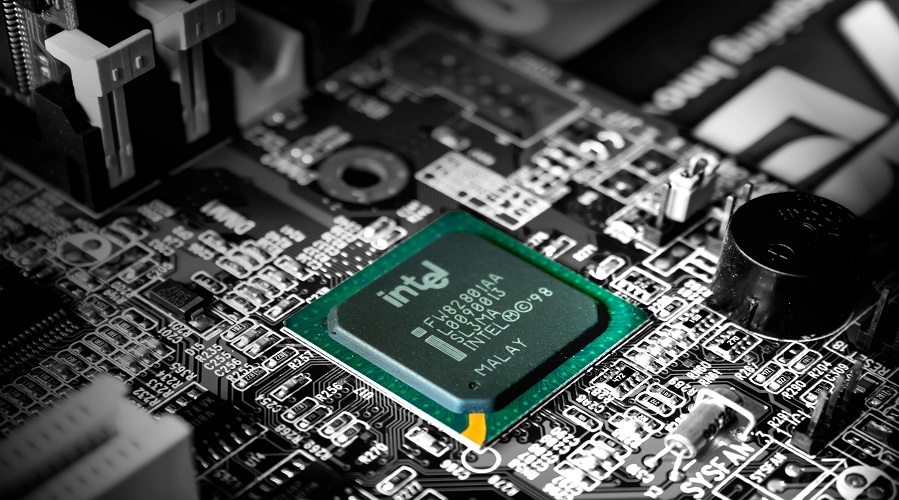
Introduction to the Computer Processor
The computer processor, commonly known as the CPU (Central Processing Unit), is the brain of a computer system. Every task performed by a computer—from opening applications to complex data analysis—depends on the processor. Without a processor, a computer cannot function.
With rapid technological advancement, processors have evolved from single-core chips to powerful multi-core units capable of handling artificial intelligence, gaming, data analytics, and cloud computing workloads.
What is a Processor (CPU)?
A processor is an electronic circuit that executes instructions provided by computer programs. It performs basic arithmetic, logical, control, and input/output operations specified by instructions.
Simple Definition:
A CPU is the main component of a computer that processes instructions and controls all operations.
History and Evolution of Processors
The evolution of processors reflects the growth of modern computing.
Major Milestones:
- 1971: Intel 4004 (first microprocessor)
- 1980s: 16-bit and 32-bit processors
- 2000s: Multi-core processors
- 2010s–Present: AI-optimized and energy-efficient CPUs
Each generation brought higher speed, better efficiency, and improved performance.
Importance of the Processor in a Computer
The processor determines:
- System speed and responsiveness
- Multitasking capability
- Compatibility with software
- Overall computing experience
A powerful CPU ensures smooth performance across applications.
Importance of the Processor in a Computer
The processor determines:
- System speed and responsiveness
- Multitasking capability
- Compatibility with software
- Overall computing experience
A powerful CPU ensures smooth performance across applications.
Main Functions of a CPU
- Executes program instructions
- Performs arithmetic and logical operations
- Controls data flow between components
- Manages system resources
Components of a Processor
Key CPU Components:
- Arithmetic Logic Unit (ALU)
- Control Unit (CU)
- Registers
- Cache Memory
These components work together to process data efficiently.
Arithmetic Logic Unit (ALU)
The Arithmetic Logic Unit (ALU) is one of the most important components of a computer system. It is a core part of the Central Processing Unit (CPU) and is responsible for performing all arithmetic and logical operations. Whenever a computer performs calculations, comparisons, or decision-making tasks, the ALU plays a central role.
From simple operations like addition and subtraction to complex logical comparisons, the ALU enables computers to process data efficiently. Understanding the Arithmetic Logic Unit (ALU) is essential for students of computer science, IT, electronics, and for those preparing for competitive examinations.
What is an Arithmetic Logic Unit (ALU)?
Definition of ALU
The Arithmetic Logic Unit (ALU) is a digital circuit within the CPU that performs arithmetic operations and logical operations on binary data.
The ALU takes input data from registers, processes it according to control signals, and produces output that is stored back in registers or memory.
Importance of ALU in a Computer System
The ALU is important because:
- It performs all mathematical calculations
- It executes logical comparisons
- It supports decision-making processes
- It enables data processing
- It increases system performance
Without the ALU, a computer cannot perform basic calculations or logical reasoning.
Functions of the Arithmetic Logic Unit
The ALU performs two main categories of operations.
1. Arithmetic Operations
Arithmetic operations involve numerical calculations.
Common arithmetic operations include:
- Addition
- Subtraction
- Multiplication
- Division
- Increment
- Decrement
These operations are essential for data processing and computation.
2. Logical Operations
Logical operations involve comparisons and decision-making.
Common logical operations include:
- AND
- OR
- NOT
- XOR
- NOR
- NAND
Logical operations help computers make decisions based on conditions.
Other Operations Performed by ALU
Apart from arithmetic and logical operations, the ALU also performs:
- Comparison operations (greater than, less than, equal to)
- Shift operations (left shift, right shift)
- Rotate operations
- Bitwise operations
Components of an ALU
The main components of an Arithmetic Logic Unit include:
- Arithmetic Circuit
Performs mathematical calculations. - Logic Circuit
Performs logical and bitwise operations. - Registers
Temporarily store input data and results. - Multiplexers
Select the required operation. - Control Unit Interface
Receives control signals from the control unit.
Types of Arithmetic Logic Unit
ALUs can be classified based on their design and functionality.
1. Binary ALU
- Operates on binary numbers
- Used in most digital computers
2. Floating-Point ALU
- Performs operations on floating-point numbers
- Used in scientific and engineering applications
3. Bit-Slice ALU
- Processes data in smaller slices
- Used in older CPU architectures
4. Integer ALU
- Performs operations on integer data
- Common in general-purpose processors
ALU Architecture
The architecture of an ALU determines how efficiently it performs operations.
Basic ALU Architecture Includes:
- Input registers
- Arithmetic circuit
- Logic circuit
- Control signals
- Output register
The control unit sends signals to the ALU to specify which operation to perform.
Working of the Arithmetic Logic Unit
The working of the ALU can be explained step by step.
- Data is loaded into registers
- The control unit sends operation instructions
- ALU selects the required operation
- Data is processed
- The result is stored back in registers or memory
This process happens in a fraction of a second.
Role of ALU in CPU
The CPU mainly consists of:
- Arithmetic Logic Unit (ALU)
- Control Unit (CU)
- Registers
The ALU works with the control unit to execute instructions fetched from memory. It performs calculations and sends results back to registers.
ALU in Modern Processors
In modern computers:
- Multiple ALUs exist in a single CPU
- ALUs support parallel processing
- Advanced ALUs improve speed and efficiency
- ALUs are optimized for specific tasks
This improves overall system performance.
Advantages of Arithmetic Logic Unit
The advantages of ALU include:
- High-speed data processing
- Accurate calculations
- Supports complex operations
- Enables multitasking
- Essential for CPU performance
Limitations of the Arithmetic Logic Unit
Despite its importance, ALU has some limitations:
- Cannot operate independently
- Depends on the control unit
- Limited by hardware design
- Consumes power
Real-Life Examples of ALU Operations
Example 1: Calculator Application
- Addition and subtraction are performed by the ALU
Example 2: Decision Making
- Logical comparisons in conditional statements
Example 3: Gaming
- Physics calculations and logic processing
Difference Between ALU and Control Unit
| Feature | ALU | Control Unit |
|---|---|---|
| Function | Performs calculations | Controls execution |
| Type of Work | Arithmetic and logical | Instruction management |
| Role | Data processing | System coordination |
ALU vs FPU
| Feature | ALU | FPU |
|---|---|---|
| Data Type | Integer and logical | Floating-point |
| Precision | Limited | High precision |
| Usage | General operations | Scientific calculations |
Applications of the Arithmetic Logic Unit
The ALU is used in:
- Computers and laptops
- Smartphones
- Embedded systems
- Digital calculators
- Microcontrollers
Importance of ALU for Students and Exams
Understanding the Arithmetic Logic Unit (ALU) is important for:
- Computer fundamentals
- Competitive exams
- Programming concepts
- Digital electronics
- CPU architecture studies
Control Unit (CU)
The Control Unit (CU) is one of the most important components of a computer system. It is a core part of the Central Processing Unit (CPU) and acts as the brain that directs and coordinates all operations within the computer. While the Arithmetic Logic Unit (ALU) performs calculations, the Control Unit ensures that all components work together in a proper sequence.
Whenever a program is executed, the Control Unit decides what to do, when to do it, and how to do it. Understanding the Control Unit (CU) is essential for students studying computer fundamentals, CPU architecture, and for those preparing for competitive examinations.
What is the Control Unit (CU)?
Definition of Control Unit
The Control Unit (CU) is a component of the CPU that controls and manages the execution of instructions by directing the operations of all other parts of the computer system.
The Control Unit does not perform calculations or data processing itself. Instead, it coordinates input, output, memory, ALU, and registers by issuing control signals.
Importance of the Control Unit in the Computer System
The Control Unit is important because:
- It manages instruction execution
- It coordinates hardware components
- It controls data flow
- It ensures the correct sequence of operations
- It enables efficient program execution
Without the Control Unit, the computer system would be unable to function properly.
Main Functions of the Control Unit
The Control Unit performs several critical functions within the CPU.
1. Instruction Fetching
The Control Unit systematically fetches instructions from main memory.
2. Instruction Decoding
After fetching an instruction, the CU decodes it to understand:
- What operation is to be performed
- Which data is required
- Where the result should be stored
3. Control Signal Generation
The Control Unit generates control signals that guide other components, such as:
- ALU
- Registers
- Memory
- Input and Output devices
4. Coordination of Operations
The CU ensures that all operations occur in the correct order and timing.
5. Handling Interrupts
The Control Unit responds to interrupts and manages task switching efficiently.
Characteristics of the Control Unit
The key characteristics of the Control Unit include:
- Does not perform data processing
- Controls execution of instructions
- Works continuously during program execution
- Coordinates CPU components
- Essential for system performance
Components of the Control Unit
The Control Unit consists of several internal components.
- Instruction Register (IR)
Holds the current instruction. - Program Counter (PC)
Stores the address of the next instruction. - Decoder
Interprets the instruction. - Control Logic
Generates control signals. - Timing and Control Circuit
Synchronizes operations.
Types of Control Unit
Based on design and implementation, the Control Unit is classified into two main types.
1. Hardwired Control Unit
A hardwired control unit uses fixed electronic circuits to generate control signals.
Features of Hardwired CU
- Faster execution
- Less flexible
- Difficult to modify
Usage
- Used in RISC processors
- Embedded systems
2. Microprogrammed Control Unit
A microprogrammed control unit uses microinstructions stored in memory.
Features of Microprogrammed CU
- More flexible
- Easier to modify
- Slower compared to hardwired CU
Usage
- Used in CISC processors
- General-purpose computers
Architecture of the Control Unit
The architecture of the Control Unit includes:
- Control memory
- Instruction decoder
- Control logic
- Timing unit
The architecture determines how efficiently the CU generates and manages control signals.
Working of the Control Unit
The working of the Control Unit follows the instruction cycle.
Step-by-Step Working Process
- Instruction is fetched from memory
- The program counter is updated
- Instruction is decoded
- Control signals are generated
- ALU and registers execute the instruction
- The result is stored
This cycle repeats continuously until program execution is complete.
Role of the Control Unit in the CPU
The CPU mainly consists of:
- Control Unit (CU)
- Arithmetic Logic Unit (ALU)
- Registers
The Control Unit acts as the coordinator, directing the ALU and registers to perform required operations.
Control Unit and Instruction Cycle
The instruction cycle consists of:
- Fetch cycle
- Decode cycle
- Execute cycle
- Store cycle
The Control Unit manages each stage of the instruction cycle efficiently.
Control Unit in Modern Processors
In modern computers:
- Control Units support pipelining
- Enable parallel instruction execution
- Manage multi-core processing
- Improve CPU efficiency
This results in faster and more efficient systems.
Advantages of the Control Unit
The advantages of the Control Unit include:
- Ensures smooth system operation
- Coordinates all components
- Improves processing speed
- Enables multitasking
- Reduces execution errors
Limitations of the Control Unit
Despite its importance, the Control Unit has some limitations:
- Does not perform calculations
- Complex design
- Failure affects the entire system
- Limited by hardware architecture
Real-Life Examples of Control Unit
Example 1: Program Execution
The CU controls the sequence of instruction execution.
Example 2: Input Handling
The CU manages data transfer from input devices.
Example 3: Multitasking
The CU switches between multiple programs efficiently.
Difference Between Control Unit and ALU
| Feature | Control Unit | ALU |
|---|---|---|
| Function | Controls operations | Performs calculations |
| Role | Coordination | Data processing |
| Data Handling | Indirect | Direct |
Control Unit vs Register
| Feature | Control Unit | Register |
|---|---|---|
| Purpose | Instruction control | Data storage |
| Location | Inside CPU | Inside CPU |
| Function | Control signals | Temporary storage |
Applications of the Control Unit
The Control Unit is used in:
- Computers and laptops
- Smartphones
- Embedded systems
- Microprocessors
- Digital devices
Importance of the Control Unit for Students
Understanding the Control Unit (CU) is important for:
- Computer architecture studies
- Competitive examinations
- Programming fundamentals
- CPU design concepts
- Digital electronics
Registers
In computer architecture, Registers play a crucial role in determining the speed and efficiency of a computer system. They are the smallest, fastest, and most expensive memory units located inside the Central Processing Unit (CPU). Every instruction executed by the CPU depends on registers for storing data, instructions, addresses, and intermediate results.
Without registers, the CPU would need to access main memory repeatedly, which would significantly slow down processing. Therefore, understanding Registers in computer architecture is essential for students, IT professionals, and those preparing for competitive examinations.
What are Registers?
Definition of Registers
Registers are small, high-speed storage locations inside the CPU that temporarily hold data, instructions, addresses, and results during program execution.
Registers enable quick access to data required by the Arithmetic Logic Unit (ALU) and Control Unit (CU), making instruction execution faster and more efficient.
Importance of Registers in a Computer System
Registers are important because:
- They provide the fastest data access
- They reduce CPU dependency on main memory
- They improve execution speed
- They support instruction processing
- They enable efficient multitasking
Without registers, modern high-speed computing would not be possible.
Characteristics of Registers
The key characteristics of registers include:
- Located inside the CPU
- Extremely fast access speed
- Very small storage capacity
- Expensive compared to other memory types
- Stores temporary data only
- Directly accessed by the CPU
Functions of Registers
Registers perform several essential functions during program execution.
Main Functions of Registers
- Store data temporarily
- Hold instructions being executed
- Store memory addresses
- Keep intermediate results
- Assist in instruction sequencing
Types of Registers
Registers are classified based on their function and usage within the CPU.
1. General Purpose Registers
Definition
General-purpose registers are used to store data and intermediate results during arithmetic and logical operations.
They are flexible and can be used for various purposes.
Examples
- Accumulator
- Data registers
2. Special Purpose Registers
Special-purpose registers perform specific functions related to instruction execution and system control.
Program Counter (PC)
The Program Counter stores the address of the next instruction to be executed.
Functions:
- Maintains execution sequence
- Updates automatically after each instruction
Instruction Register (IR)
The Instruction Register holds the current instruction being executed by the CPU.
Functions:
- Stores fetched instruction
- Helps in instruction decoding
Accumulator Register
The Accumulator stores intermediate arithmetic and logical results.
Functions:
- Works closely with ALU
- Stores temporary results
Memory Address Register (MAR)
The Memory Address Register stores the address of the memory location to be accessed.
Functions:
- Supports memory read/write operations
Memory Data Register (MDR)
The Memory Data Register holds data being transferred to or from memory.
Functions:
- Acts as a data buffer
Stack Pointer (SP)
The Stack Pointer stores the address of the top of the stack.
Functions:
- Supports function calls
- Manages stack operations
Flag Register (Status Register)
The Flag Register stores status flags resulting from operations.
Common flags:
- Zero flag
- Carry flag
- Sign flag
- Overflow flag
3. Index Register
Index Registers are used for indexed addressing and array processing.
Functions:
- Supports loop execution
- Improves program efficiency
4. Base Register
The Base Register holds the base address for program execution.
Functions:
- Supports memory addressing
- Enhances program relocation
5. Control Registers
Control Registers manage CPU operation and system control.
Functions:
- Control execution modes
- Manage system-level operations
Register Organization in CPU
Registers are organized into a register file, which allows fast access and parallel processing.
The registration organization depends on:
- CPU architecture
- Instruction set
- Performance requirements
Working of Registers
The working of registers can be explained step by step.
Step-by-Step Process
- Instruction is fetched from memory
- Instruction is stored in the Instruction Register
- Data is loaded into registers
- ALU performs operations
- Results are stored in registers
- Data is written back to memory if required
This entire process occurs in nanoseconds.
Registers and Instruction Cycle
Registers play a key role in each stage of the instruction cycle.
- Fetch stage uses PC and IR
- The decode stage uses control registers
- The execute stage uses the accumulator and general registers
- Store stage uses MDR and MAR
Registers vs Main Memory
| Feature | Registers | Main Memory |
|---|---|---|
| Location | Inside CPU | Outside CPU |
| Speed | Very fast | Slower |
| Size | Very small | Large |
| Cost | Very high | Lower |
| Usage | Temporary storage | Permanent storage |
Registers vs Cache Memory
| Feature | Registers | Cache Memory |
|---|---|---|
| Speed | Faster | Slightly slower |
| Location | Inside CPU | Near CPU |
| Size | Very small | Larger |
| Access | Direct | Indirect |
Advantages of Registers
The advantages of registers include:
- Fastest memory access
- Improves CPU performance
- Reduces memory access time
- Supports efficient execution
- Essential for high-speed processing
Limitations of Registers
Despite their importance, registers have limitations:
- Very limited storage capacity
- High cost
- Cannot store data permanently
- Limited number per CPU
Real-Life Examples of Register Usage
Example 1: Arithmetic Operations
Operands are stored in registers for fast calculation.
Example 2: Loop Execution
Index registers control loop counters.
Example 3: Function Calls
The stack pointer manages return addresses.
Registers in Modern Processors
Modern CPUs use:
- Multiple general-purpose registers
- Register renaming
- Parallel register access
- Specialized registers for performance
These advancements significantly improve execution speed.
Importance of Registers for Students and Exams
Understanding Registers in computer architecture is important for:
- Computer fundamentals
- Competitive examinations
- CPU architecture studies
- Programming efficiency
- Digital electronics
Applications of Registers
Registers are used in:
- Desktop computers
- Laptops
- Smartphones
- Embedded systems
- Microcontrollers
Cache Memory
In modern computer systems, speed and performance are critical. One of the key components that significantly improves system performance is Cache Memory. Cache memory acts as a high-speed buffer between the CPU and main memory, reducing the time required to access frequently used data and instructions.
The processor operates at a very high speed, while the main memory (RAM) is comparatively slower. This speed difference can create a bottleneck. Cache memory solves this problem by storing frequently accessed data closer to the CPU, allowing faster execution of programs.
What is Cache Memory?
Definition of Cache Memory
Cache Memory is a small, high-speed memory located between the CPU and main memory that stores frequently used data and instructions to reduce access time.
Cache memory is much faster than RAM but smaller in size and more expensive.
Importance of Cache Memory in a Computer System
Cache memory is important because:
- It reduces CPU waiting time
- It improves overall system performance
- It minimizes memory access latency
- It supports high-speed processing
- It increases execution efficiency
Without cache memory, modern processors would not be able to achieve high performance.
Characteristics of Cache Memory
The key characteristics of cache memory include:
- Very high access speed
- Small storage capacity
- Located close to or inside the CPU
- Expensive compared to RAM
- Stores temporary data
- Uses the principle of locality
Principle of Locality
Cache memory works based on the principle of locality, which states that programs tend to access the same data repeatedly.
Types of Locality
- Temporal Locality
Data accessed recently is likely to be accessed again. - Spatial Locality
Data located near recently accessed data is likely to be accessed soon.
Types of Cache Memory
Cache memory can be classified based on its level and functionality.
Cache Memory Levels
Modern computer systems use multiple levels of cache memory.
Level 1 Cache (L1 Cache)
L1 Cache is the fastest and smallest cache memory located directly inside the CPU core.
Characteristics:
- Extremely fast
- Very small size
- Dedicated to individual cores
Level 2 Cache (L2 Cache)
L2 Cache is larger than L1 cache and slightly slower.
Characteristics:
- Located inside or near the CPU
- May be shared or dedicated
- Stores additional frequently used data
Level 3 Cache (L3 Cache)
L3 Cache is larger and slower than L1 and L2 cache but faster than RAM.
Characteristics:
- Shared among multiple cores
- Improves multi-core performance
Cache Memory Mapping Techniques
Cache memory uses mapping techniques to decide where data from main memory is stored.
1. Direct Mapping
Each block of main memory maps to exactly one cache line.
Advantages:
- Simple design
- Fast access
Limitations:
- High chance of cache conflicts
2. Fully Associative Mapping
A block of main memory can be placed anywhere in the cache.
Advantages:
- Flexible placement
- Fewer cache misses
Limitations:
- Complex and expensive
3. Set-Associative Mapping
A combination of direct and associative mapping.
Advantages:
- Balanced performance
- Reduced conflicts
Limitations:
- More complex than direct mapping
Cache Memory Replacement Policies
When the cache is full, a replacement policy decides which data to remove.
Common replacement policies include:
- Least Recently Used (LRU)
- First In First Out (FIFO)
- Least Frequently Used (LFU)
- Random Replacement
Working of Cache Memory
The working of cache memory follows these steps.
Step-by-Step Working Process
- CPU requests data
- Cache memory checks for data
- If found, it is a cache hit
- If not found, it is a cache miss
- Data is fetched from RAM
- Cache is updated
- Data is sent to the CPU
This process occurs in a very short time.
Cache Hit and Cache Miss
Cache Hit
- Requested data is found in cache
- Faster access time
Cache Miss
- Requested data is not found in the cache
- Slower access time
Cache Memory vs Main Memory (RAM)
| Feature | Cache Memory | Main Memory |
|---|---|---|
| Speed | Very fast | Slower |
| Size | Very small | Large |
| Cost | High | Lower |
| Location | Near CPU | Outside CPU |
| Purpose | Speed optimization | Data storage |
Cache Memory vs Registers
| Feature | Cache Memory | Registers |
|---|---|---|
| Speed | Very fast | Fastest |
| Size | Small | Very small |
| Location | Near CPU | Inside CPU |
| Usage | Data buffering | Direct execution |
Advantages of Cache Memory
The advantages of cache memory include:
- Reduces memory access time
- Improves CPU performance
- Enhances system efficiency
- Supports multitasking
- Minimizes bottlenecks
Limitations of Cache Memory
Despite its benefits, cache memory has limitations:
- Very expensive
- Limited storage capacity
- Complex management
- Not user-configurable
Cache Memory in Modern Computers
Modern processors use:
- Multi-level cache hierarchy
- Shared cache for multi-core CPUs
- Smart cache management techniques
- Advanced replacement algorithms
These features significantly improve performance.
Applications of Cache Memory
Cache memory is used in:
- Desktop and laptop computers
- Smartphones
- Servers
- Embedded systems
- High-performance computing
Importance of Cache Memory for Students and Exams
Understanding Cache Memory is important for:
- Computer fundamentals
- CPU architecture studies
- Competitive examinations
- System performance analysis
- Programming efficiency
Real-Life Example of Cache Memory
When you open an application repeatedly, it loads faster the second time because relevant data may already be stored in cache memory.
CPU Architecture Explained
CPU architecture defines the structure and behavior of a processor.
Common Architectures:
- x86 Architecture
- ARM Architecture
- RISC-V Architecture
Each architecture is optimized for specific use cases.
CPU Cores and Threads
A core is an independent processing unit within a CPU.
Key Concepts:
- Single-core vs Multi-core
- Threads enable parallel processing
More cores and threads improve multitasking and performance.
Clock Speed and Performance
Clock speed, measured in GHz, indicates how many cycles a processor executes per second.
Higher clock speed generally means better performance, but architecture and cores also matter.
Instruction Set Architecture (ISA)
ISA defines how software communicates with hardware.
Common ISAs:
- x86-64
- ARM
- RISC-V
Types of Processors
Based on Design:
- Microprocessors
- Microcontrollers
- Embedded Processors
Processor Based on Number of Cores
- Single-core
- Dual-core
- Quad-core
- Octa-core and above
Processor Based on Usage
- Desktop processors
- Mobile processors
- Server processors
Desktop Processors
Desktop CPUs focus on high performance and upgrade flexibility.
Laptop and Mobile Processors
Mobile processors emphasize energy efficiency and portability.
Laptop and Mobile Processors
Mobile processors emphasize energy efficiency and portability.
Server and Workstation Processors
Server CPUs are designed for reliability, scalability, and heavy workloads.
CPU Socket and Compatibility
The CPU socket determines which processors are supported by a motherboard.
Integrated Graphics in Processor
Many modern CPUs include integrated GPUs for basic graphics tasks.
Power Consumption and TDP
Thermal Design Power (TDP) indicates heat output and power consumption.
Lower TDP means better energy efficiency.
Processor for Gaming
Gaming CPUs require:
- High clock speeds
- Multiple cores
- Strong single-core performance
Processor for Office and Business Use
Office CPUs focus on reliability and energy efficiency.
Processor for Content Creation
Content creators need CPUs with high core counts and multitasking ability.
Processor for Servers and Data Centers
Server processors handle virtualization, databases, and cloud workloads.
How to Choose the Right Processor
Key Factors:
- Intended usage
- Core and thread count
- Clock speed
- Budget
- Compatibility
Advantages and Disadvantages of Processors
Advantages:
- High processing speed
- Multitasking capabilities
Disadvantages:
- Heat generation
- Power consumption
Common Processor Problems and Solutions
- Overheating
- System crashes
- Compatibility issues
Proper cooling and updates help prevent problems.
Future Trends in Processor Technology
- AI acceleration
- Quantum computing
- Improved energy efficiency
Q1. What is a processor in a computer?
A processor is the main unit that executes instructions and controls computer operations.
Q2. Which processor is best for gaming?
High clock-speed multi-core processors are ideal for gaming.
Q3. What is the difference between cores and threads?
Cores are physical units, while threads are virtual units for multitasking.
Q4. How long does a processor last?
Typically 7–10 years under normal use.
Q5. What is the future of processors?
The future includes AI integration and energy-efficient designs.
Conclusion
The processor is the heart of any computing device. It determines performance, efficiency, and user experience. By understanding CPU architecture, types, features, and use cases, users can make informed decisions when buying or upgrading a computer. As technology advances, processors will continue to power innovation across industries.
Leave a Comment
Your email address will not be published. Required fields are marked *
Related Post
Git & GitHub Version Control Tutorial for Beginners
Learn Git & GitHub Version Control with this complete beginner-to-advanced guide. Understand Git commands, repositories, branching, merging,
CI/CD Pipelines Complete Guide – Continuous Integration
Learn everything about CI/CD Pipelines in this complete guide. Understand Continuous Integration, Continuous Deployment.
DevOps: Ultimate Guide to DevOps Practices, Tools
Explore the complete DevOps guide for 2026. Learn DevOps practices, tools, benefits, CI/CD pipelines, automation, culture, and more.
What is Cloud Platforms? Types, Benefits
Learn everything about Cloud Platforms. Understand cloud computing platforms, types, benefits, services, use cases, security, and future trends.
Encryption: Types, Algorithms, Security and Data Encryption
Learn everything about Encryption in this complete guide. Understand what encryption is, types of encryption, algorithms, advantages, data security.
Ethical Hacking: Complete Guide, Tools, Techniques
Learn Ethical Hacking in this complete guide. Understand ethical hackers, types, tools, techniques, and cybersecurity best practices.
Network Security and Firewalls – Types, Architecture
Learn Network Security & Firewalls in detail. This complete guide covers concepts, types of firewalls, architecture, security threats, and more.
Network Routing and Switching – Types, Protocols & Working
Learn everything about Network Routing and Switching. Understand concepts, types, protocols, devices, differences, advantages, and more.
IP Addressing - IPv4, IPv6, Working, Types, Structure, Security
Internet Protocol (IP) is the foundation of the internet. Learn everything about IP, including IPv4, IPv6, IP addressing, packet delivery, and more.
Transmission Control Protocol (TCP) - Working, Features, Use
Learn everything about Transmission Control Protocol (TCP) in this complete SEO-friendly guide. Understand TCP definition, and more.