
Output Devices of Computer
Introduction to Output Devices
Output devices are essential hardware components that allow a computer to communicate results to the user. When we type, click, process data, or run applications, the computer performs calculations inside the CPU. But how do we see or hear the results?
This is where output devices come into play. They convert digital signals from the computer into human-understandable forms such as text, images, audio, and video.
What Are Output Devices?
An output device is a hardware component that receives data from the computer and presents it in a human-readable form.
Output can be:
- Visual (images, videos)
- Audio (sound, music)
- Physical (printed documents)
Types of Output Devices
Below are the most important output devices used in computers, offices, homes, industries, education, and multimedia.
1. Monitor – Primary Visual Output Device
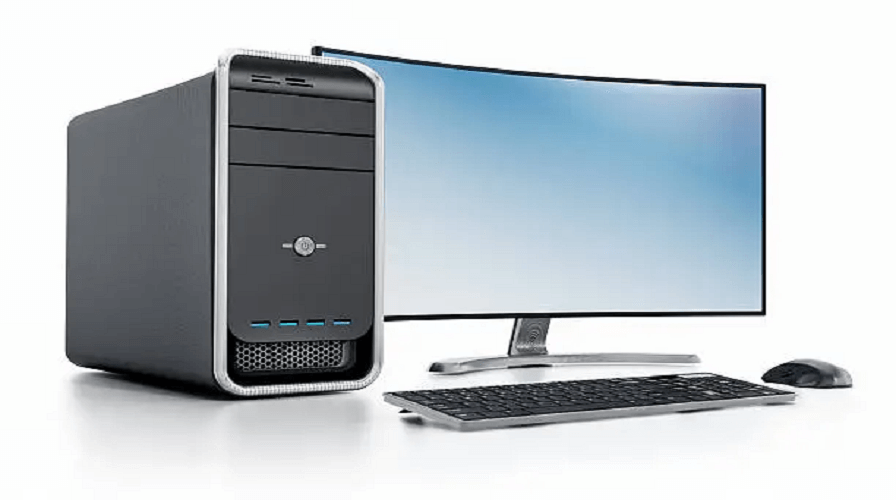
The monitor displays images, videos, text, and graphics. It is the most important output device for all computers.
Types of Monitors
- CRT Monitor (Old Technology)
- LCD Monitor
- LED Monitor (Modern & Popular)
- OLED Monitor (High Quality)
- Touchscreen Monitor
4K & 8K Monitors for gaming/designing
Functions
- Shows graphic interface
- Displays output of all tasks
- Essential for gaming, designing, editing
2. Printer – Produces Printed Output
A printer converts digital documents into physical paper form. It is used in offices, schools, shops, and homes.
Types of Printers
- Inkjet Printer
- Laser Printer
- Dot Matrix Printer
- Photo Printer
- Thermal Printer
3D Printer (Modern Technology)
Uses of Printers
- Document printing
- Photo printing
- Barcode & bill printing
- 3D object printing
3. Speakers – Audio Output Device
Speakers produce sound output such as music, notifications, voice, and multimedia audio.
Functions
- Used in video streaming
- Gaming
- Video calls
- Watching movies
4. Headphones & Earphones
These are personal audio output devices used for private listening.
Features
- Noise cancellation
- Bluetooth/Wireless
- Better audio clarity
5. Projector – Large Display Output Device
A projector displays images or videos onto a large screen or wall.
Where Projectors Are Used
- Classrooms
- Offices
- Movie theaters
- Seminars & presentations
6. Plotter – Output Device for Large Graphics
A plotter prints large designs such as maps, blueprints, posters, banners, and engineering drawings.
Types of Plotters
- Drum Plotter
- Flatbed Plotter
- Inkjet Plotter
7. Braille Reader – Output Device for Disabled Users
A Braille display converts text into raised dots that blind users can feel.
8. VR Headset – Virtual Reality Output
VR headsets provide 3D visuals with immersive sound.
Uses
- Gaming
- Training simulations
- Virtual tours
- Medical education
9. LED Indicators
LED lights indicate device status such as charging, processing, notifications, or errors.
10. GPS Output Device
Displays live location and navigation output.
Used in cars, phones, and smart devices.
11. Smartboards – Interactive Output
Used in schools & training centers, these boards display content and support touch interaction.
12. Sound Cards – Audio Processing Output
A sound card works with speakers to produce high-quality audio output.
13. Television as Output Device
Modern smart TVs act as computer output devices, displaying videos, games, and presentations.
Extra Output Devices
- Digital Cameras (for playback)
- Fax Machines
- Haptic Devices (feedback output)
- Wearable Displays
- Smartwatches (notification output)
Importance of Output Devices
Output devices are important because they:
- Help users see or hear the result of processed data
- Convert digital data into human-friendly format
- Enable printing, presenting, and communicating
- Support education, offices, entertainment, and industries
Difference Between Input and Output Devices
| Input Devices | Output Devices |
|---|---|
| Send data to computer | Receive and show results |
| Keyboard, Mouse, Scanner | Monitor, Printer, Speakers |
| Take commands | Display or produce output |
Characteristics of Good Output Devices
- High quality
- Fast performance
- Energy efficient
- User-friendly
- Durable
- Accurate results
Conclusion –
Output devices are the backbone of communication between the computer and the user. From monitors and printers to speakers and VR headsets, they help us visualize, hear, and understand the computer’s processed data. As technology grows, modern output devices are becoming smarter, faster, and more interactive, improving the digital experience.
1. What is an output device?
Any hardware device that displays, prints, or produces results from a computer.
2. What are 5 common output devices?
Monitor, Printer, Speakers, Projector, Headphones.
3. Is a monitor an output device?
Yes, it displays visual output.
4. Is a printer an output device?
Yes, because it produces printed physical output.
5. Is a projector an input or output device?
A projector is an output device.
6. Is a speaker an output device?
Yes, speakers output sound.
7. What is the difference between speakers and headphones?
Speakers play sound openly, while headphones provide private listening.
8. Is a touchscreen an output device?
A touchscreen is both input and output device.
9. What is a plotter used for?
Printing large graphics like maps, banners, and engineering drawings.
10. Can a TV be an output device?
Yes, when connected to a computer, a TV works as a video output device.
Leave a Comment
Your email address will not be published. Required fields are marked *
Related Post
Git & GitHub Version Control Tutorial for Beginners
Learn Git & GitHub Version Control with this complete beginner-to-advanced guide. Understand Git commands, repositories, branching, merging,
CI/CD Pipelines Complete Guide – Continuous Integration
Learn everything about CI/CD Pipelines in this complete guide. Understand Continuous Integration, Continuous Deployment.
DevOps: Ultimate Guide to DevOps Practices, Tools
Explore the complete DevOps guide for 2026. Learn DevOps practices, tools, benefits, CI/CD pipelines, automation, culture, and more.
What is Cloud Platforms? Types, Benefits
Learn everything about Cloud Platforms. Understand cloud computing platforms, types, benefits, services, use cases, security, and future trends.
Encryption: Types, Algorithms, Security and Data Encryption
Learn everything about Encryption in this complete guide. Understand what encryption is, types of encryption, algorithms, advantages, data security.
Ethical Hacking: Complete Guide, Tools, Techniques
Learn Ethical Hacking in this complete guide. Understand ethical hackers, types, tools, techniques, and cybersecurity best practices.
Network Security and Firewalls – Types, Architecture
Learn Network Security & Firewalls in detail. This complete guide covers concepts, types of firewalls, architecture, security threats, and more.
Network Routing and Switching – Types, Protocols & Working
Learn everything about Network Routing and Switching. Understand concepts, types, protocols, devices, differences, advantages, and more.
IP Addressing - IPv4, IPv6, Working, Types, Structure, Security
Internet Protocol (IP) is the foundation of the internet. Learn everything about IP, including IPv4, IPv6, IP addressing, packet delivery, and more.
Transmission Control Protocol (TCP) - Working, Features, Use
Learn everything about Transmission Control Protocol (TCP) in this complete SEO-friendly guide. Understand TCP definition, and more.