
Input Devices of Computer – Definition, Types, Functions
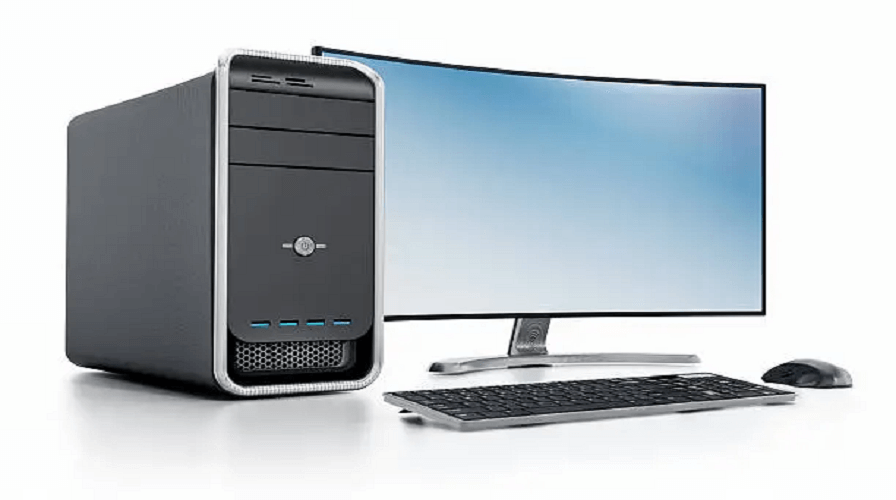
Introduction to Input Devices
Input devices are essential hardware components that allow users to enter data, commands, and instructions into a computer system. Without input devices, a computer cannot receive user information or perform tasks. From typing on a keyboard to scanning documents or giving voice commands, everything begins with an input device. This guide covers all major input devices, their functions, and detailed examples, written in simple and SEO-friendly language.
What Are Input Devices?
An input device is a hardware device that allows users to give information to the computer. Input can be in the form of text, images, audio, video, gestures, or commands. The computer then processes this input and generates output.
Types of Input Devices
1. Keyboard – Primary Text Input Device
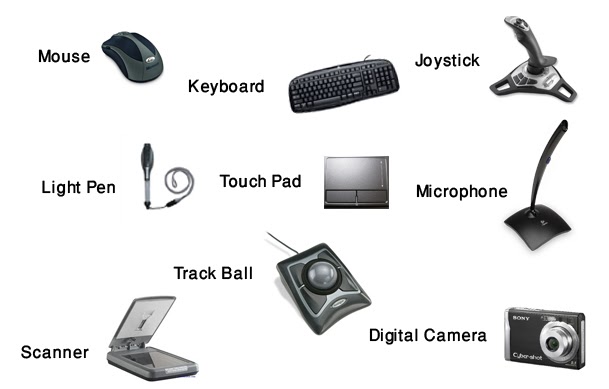
A keyboard is the most common input device used to type text, numbers, and commands. It contains function keys, alphabet keys, numeric keys, and special keys such as Enter, Spacebar, Shift, Ctrl, and Alt.
Types of Keyboards
- Standard Keyboard
- Mechanical Keyboard
- Wireless Keyboard
- Virtual/On-screen Keyboard
- Ergonomic Keyboard
Keyboards are essential for writing documents, coding, gaming, and operating the computer.
2. Mouse – Pointing and Selection Device
A mouse helps users control the cursor on the screen. It is mainly used for clicking, selecting, dragging, and scrolling.
Types of Mouse
- Wired Mouse
- Wireless Mouse
- Optical Mouse
- Laser Mouse
- Trackball Mouse
- Gaming Mouse
3. Touchscreen – Modern Input Device
A touchscreen allows users to interact directly by touching the screen. It detects gestures like tap, swipe, zoom, and scroll.
Where Touchscreens Are Used
- Smartphones
- Tablets
- ATMs
- POS Machines
- Laptops
4. Scanner – Converts Physical Documents to Digital Form
A scanner takes physical documents or photos and converts them into digital files. It is widely used in offices, education, and digital archiving.
Types of Scanners
- Flatbed Scanner
- Sheet-fed Scanner
- Handheld Scanner
- QR/Barcode Scanner
5. Microphone – Audio Input Device
A microphone captures sound and converts it into digital signals. It is used for online meetings, voice recording, gaming, and voice commands.
Common Microphone Uses
- Voice calling
- Music recording
- Voice control (Alexa, Google Assistant)
- Podcasting
6. Webcam – Video Input Device
A webcam captures images and live video. It is mainly used for video calls, online classes, and live streaming.
7. Joystick – Gaming Input Device
A joystick is used for gaming and controlling simulations. It helps users move objects in different directions using a lever.
8. Light Pen – Drawing & Precision Input Device
A light pen is used to draw on the screen or select items with precision. It was mainly used in older computers and graphics applications.
9. Graphics/Digital Pen Tablet
A digital pen tablet allows artists to draw digitally. It captures pen movement and pressure levels.
10. Barcode Reader
This device reads barcodes printed on products. It is widely used in malls, supermarkets, and warehouses.
11. QR Code Scanner
A QR scanner reads quick response codes and provides digital information. Mobile phones now include built-in QR scanners.
12. Biometric Devices – Fingerprint, Iris & Face Recognition
Biometric input devices read human characteristics like fingerprints or facial patterns and convert them into digital data.
Types of Biometric Devices
- Fingerprint Scanner
- Face Recognition Camera
- Iris Scanner
These are used for authentication and security purposes.
13. Trackpad / Touchpad
A trackpad is commonly found on laptops. It allows users to move the cursor using finger movements.
14. Game Controller
Used for console and PC gaming. Includes buttons, triggers, and joysticks for interaction.
15. Stylus Pen
A stylus is used to write or draw on touchscreen devices like tablets and smartphones.
Input devices are crucial because they:
- Allow users to communicate with the computer
- Convert real-world data into digital form
- Help in controlling applications and games
- Support modern technologies like biometrics and touchscreens
- Enable creativity (drawing, designing, audio/video recording)
Difference Between Input and Output Devices
| Input Devices | Output Devices |
|---|---|
| Give data to computer | Show results to user |
| Keyboard, Mouse, Scanner | Monitor, Printer, Speakers |
Conclusion
Input devices are the foundation of human–computer interaction. From the basic keyboard and mouse to advanced biometric and digital pen devices, each plays a significant role in making modern computing easier and efficient. Understanding input devices is essential for students, beginners, and anyone wanting to strengthen their computer knowledge.
1. What is an input device?
An input device is hardware that allows users to give information to the computer.
2. What are the four main input devices?
Keyboard, Mouse, Scanner, Microphone.
3. Is a touchscreen an input device?
Yes, a touchscreen is both an input and output device.
4. Is a scanner an input or output device?
A scanner is an input device.
5. What is the difference between input and output devices?
Input devices send data to a computer, while output devices display results.
6. Is a printer an input device?
No, a printer is an output device.
7. What are biometric input devices?
Devices like fingerprint scanners and face recognition cameras.
Leave a Comment
Your email address will not be published. Required fields are marked *
Related Post
Git & GitHub Version Control Tutorial for Beginners
Learn Git & GitHub Version Control with this complete beginner-to-advanced guide. Understand Git commands, repositories, branching, merging,
CI/CD Pipelines Complete Guide – Continuous Integration
Learn everything about CI/CD Pipelines in this complete guide. Understand Continuous Integration, Continuous Deployment.
DevOps: Ultimate Guide to DevOps Practices, Tools
Explore the complete DevOps guide for 2026. Learn DevOps practices, tools, benefits, CI/CD pipelines, automation, culture, and more.
What is Cloud Platforms? Types, Benefits
Learn everything about Cloud Platforms. Understand cloud computing platforms, types, benefits, services, use cases, security, and future trends.
Encryption: Types, Algorithms, Security and Data Encryption
Learn everything about Encryption in this complete guide. Understand what encryption is, types of encryption, algorithms, advantages, data security.
Ethical Hacking: Complete Guide, Tools, Techniques
Learn Ethical Hacking in this complete guide. Understand ethical hackers, types, tools, techniques, and cybersecurity best practices.
Network Security and Firewalls – Types, Architecture
Learn Network Security & Firewalls in detail. This complete guide covers concepts, types of firewalls, architecture, security threats, and more.
Network Routing and Switching – Types, Protocols & Working
Learn everything about Network Routing and Switching. Understand concepts, types, protocols, devices, differences, advantages, and more.
IP Addressing - IPv4, IPv6, Working, Types, Structure, Security
Internet Protocol (IP) is the foundation of the internet. Learn everything about IP, including IPv4, IPv6, IP addressing, packet delivery, and more.
Transmission Control Protocol (TCP) - Working, Features, Use
Learn everything about Transmission Control Protocol (TCP) in this complete SEO-friendly guide. Understand TCP definition, and more.