
Basic Computer Components – Definition, Types & Functions
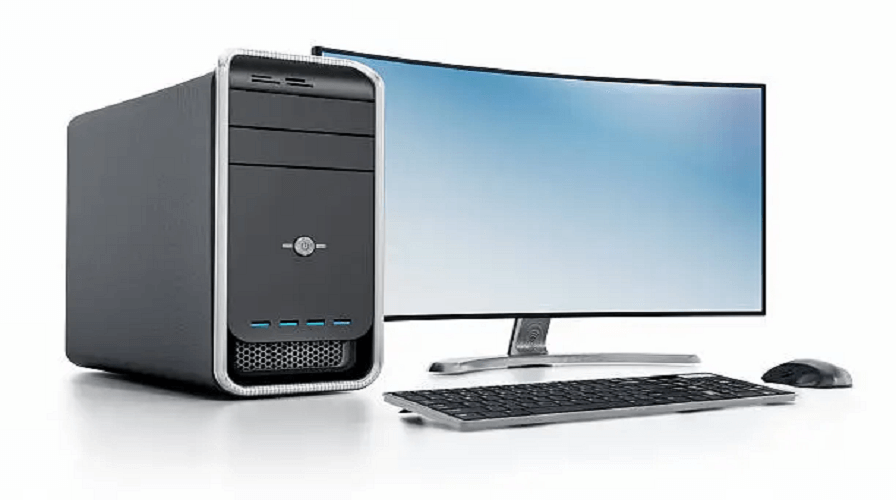
Introduction to Basic Computer Components
A computer is made up of different hardware components that work together to perform tasks. Whether you are a beginner, a student, or someone preparing for competitive exams, understanding the basic parts of a computer is essential. Each component plays a unique role—some handle input, some process data, while others store or display information. In this guide, we will explore all major computer components, their functions, and how they make a computer system work effectively.
What Are Computer Components?
Computer components are physical parts of a computer system, commonly known as hardware. These components interact with software to perform operations such as typing, browsing the internet, listening to music, or running applications. Examples include the CPU, Monitor, Keyboard, RAM, Motherboard, and more.
Main Basic Computer Components
1. Central Processing Unit (CPU) – The Brain of the Computer
The CPU is the most important component of a computer. It processes all instructions from hardware and software. The CPU performs three main functions:
- Fetch – receives instructions
- Decode – understands the instructions
- Execute – performs actions
Without a CPU, no task can be executed.
Types of CPU
- Single-core Processor
- Dual-core Processor
- Quad-core Processor
- Octa-core and higher
2. Motherboard – The Backbone of the System
The motherboard is a large circuit board that connects all components of a computer. It allows each part to communicate with others.
Key Functions
- Connects CPU, RAM, storage, and power supply
- Manages communication between devices
- Hosts ports like USB, HDMI, LAN, etc.
3. RAM (Random Access Memory) – Temporary Memory
RAM is the short-term memory of a computer. It stores data temporarily while the system is running. More RAM = Faster performance.
Popular RAM Types
- DDR3
- DDR4
- DDR5 (latest)
4. Storage Devices – Hard Disk, SSD & NVMe
Storage is where all your files, programs, photos, and software are saved permanently.
Types of Storage Devices
- HDD (Hard Disk Drive): Traditional, slower, cheaper
- SSD (Solid State Drive): Faster than HDD
- NVMe SSD: Very fast, used in modern laptops/PCs
5. Power Supply Unit (PSU) – Provides Power
The PSU converts AC power into DC power to run the computer. It supplies electricity to the motherboard, CPU, storage, and peripherals.
6. Input Devices – Helping Users Give Commands
These devices allow users to enter data into the computer.
Examples of Input Devices
- Keyboard
- Mouse
- Scanner
- Microphone
- Webcam
- Joystick
- Touchpad
7. Output Devices – Display and Produce Results
Output devices show the result of processed data.
Examples of Output Devices
- Monitor
- Printer
- Speakers
- Projector
8. Graphics Card (GPU) – For Display & Gaming
A GPU processes graphics, images, videos, and animations. It is essential for gaming, video editing, and design.
Types of GPU
- Integrated Graphics (Built into CPU)
- Dedicated Graphics Card (NVIDIA, AMD)
9. Cooling System – Keeping Components Cool
Computers generate heat while working. Cooling systems prevent overheating.
Cooling Methods
- Air Cooling (Fans)
- Liquid Cooling (Water cooling setup)
10. Computer Case (Cabinet) – Protecting Components
The computer case holds and protects all internal components. It includes spaces for cooling fans, storage, and ports.
Additional Computer Components
11. Network Interface Card (NIC) – For Internet & LAN
Helps in connecting the computer to a network using Wi-Fi or Ethernet.
12. BIOS/UEFI – Boot System Software
BIOS/UEFI is the system that loads (boots) the operating system when you start your computer.
13. Sound Card – Audio Processing Component
It handles all audio-related tasks such as music, recording, and sound output.
Advantages of Understanding Computer Components
- Helps in choosing the right computer
- Easier to solve basic computer problems
- Useful for students & beginners
- Helps in understanding computer performance
Supports computer assembly knowledge
Conclusion –
Understanding basic computer components is the first step toward becoming computer-literate. Whether you want to build a PC, repair a system, prepare for exams, or simply understand how technology works, this guide gives you complete clarity. All parts—from CPU to GPU, RAM to storage—work together to make a computer function smoothly.
1. What are the 5 basic computer components?
CPU, RAM, Storage, Input Devices, Output Devices.
2. Which is the brain of the computer?
The CPU is known as the brain of the computer.
3. What is the main storage device in a computer?
HDD, SSD, or NVMe are the main storage devices.
4. What is RAM used for?
RAM stores temporary data and increases computer speed.
5. What is the motherboard?
A motherboard connects all components and allows communication between them.
Leave a Comment
Your email address will not be published. Required fields are marked *
Related Post
Git & GitHub Version Control Tutorial for Beginners
Learn Git & GitHub Version Control with this complete beginner-to-advanced guide. Understand Git commands, repositories, branching, merging,
CI/CD Pipelines Complete Guide – Continuous Integration
Learn everything about CI/CD Pipelines in this complete guide. Understand Continuous Integration, Continuous Deployment.
DevOps: Ultimate Guide to DevOps Practices, Tools
Explore the complete DevOps guide for 2026. Learn DevOps practices, tools, benefits, CI/CD pipelines, automation, culture, and more.
What is Cloud Platforms? Types, Benefits
Learn everything about Cloud Platforms. Understand cloud computing platforms, types, benefits, services, use cases, security, and future trends.
Encryption: Types, Algorithms, Security and Data Encryption
Learn everything about Encryption in this complete guide. Understand what encryption is, types of encryption, algorithms, advantages, data security.
Ethical Hacking: Complete Guide, Tools, Techniques
Learn Ethical Hacking in this complete guide. Understand ethical hackers, types, tools, techniques, and cybersecurity best practices.
Network Security and Firewalls – Types, Architecture
Learn Network Security & Firewalls in detail. This complete guide covers concepts, types of firewalls, architecture, security threats, and more.
Network Routing and Switching – Types, Protocols & Working
Learn everything about Network Routing and Switching. Understand concepts, types, protocols, devices, differences, advantages, and more.
IP Addressing - IPv4, IPv6, Working, Types, Structure, Security
Internet Protocol (IP) is the foundation of the internet. Learn everything about IP, including IPv4, IPv6, IP addressing, packet delivery, and more.
Transmission Control Protocol (TCP) - Working, Features, Use
Learn everything about Transmission Control Protocol (TCP) in this complete SEO-friendly guide. Understand TCP definition, and more.