
Computer Networks Basics and Advanced Concepts – Definition
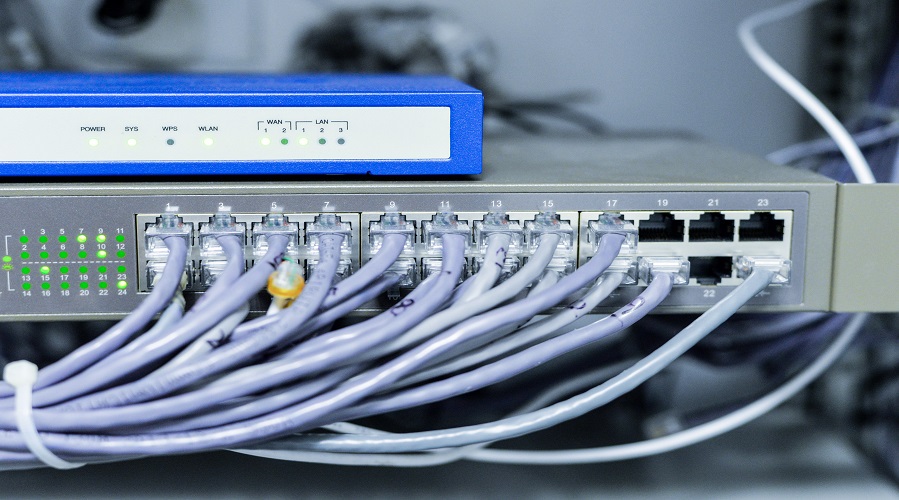
Introduction to Computer Networks
A Computer Network is a system where multiple computers, devices, or nodes are interconnected to share data, resources, and services. Networking allows machines to communicate, collaborate, and access information efficiently and securely.
In today’s digital world, computer networks form the backbone of communication, powering everything from emails and online banking to social media, cloud computing, and mobile applications. Whether you’re using the internet, connecting to Wi-Fi, or sharing files between computers, you are using a network.
Understanding computer networks is essential because modern technology—from smartphones to servers—relies on robust networking to function smoothly.
What is a Computer Network?
A Computer Network is a group of two or more devices connected together for the purpose of communication and resource sharing.
Networks allow users to share:
- Data
- Files
- Internet
- Applications
- Printers
- Storage
The connectivity can be wired (cables), wireless (Wi-Fi), or a combination of both.
In simple words, a network enables the exchange of information between two or more connected devices.
Why are Computer Networks Important?
Computer networks are essential for:
- Communication (emails, messaging, video calls)
- Data sharing
- Resource sharing (printers, storage)
- Remote access
- Online services
- Collaborative work
- Cloud computing
- E-commerce and digital payments
- Business automation
Without computer networks, modern digital life wouldn’t be possible.
Types of Computer Networks
Computer networks are classified based on size, range, and purpose.
1. PAN (Personal Area Network)
A small network is created around a single person, usually within 10 meters.
Examples:
- Bluetooth devices
- Smartphone hotspot
- Smartwatch connectivity
2. LAN (Local Area Network)
Operates within a small geographic area such as a home, office, school, or building.
LANs are fast, secure, and cost-effective.
3. MAN (Metropolitan Area Network)
Covers a larger area, such as a city or campus.
Examples:
- City-wide Wi-Fi
- University campus networks
4. WAN (Wide Area Network)
Covers large geographical areas, even global distances.
The Internet is the biggest example of a WAN.
5. CAN (Campus Area Network)
Used in educational campuses or business complexes.
6. SAN (Storage Area Network)
Used for high-speed storage and database access.
7. VPN (Virtual Private Network)
Creates a secure private connection over the public internet.
Network Topologies
Network topology refers to the physical or logical arrangement of devices in a network.
1. Bus Topology
Devices are connected on a single cable. Cost-effective but outdated.
2. Star Topology
All devices connect to a central switch or hub. Most popular LAN topology.
3. Ring Topology
Devices form a circular pathway. Failure in one node affects the whole ring.
4. Mesh Topology
Every device connects to every other device. Highly reliable but expensive.
5. Tree Topology
A hybrid of bus and star topology, used in large organizations.
6. Hybrid Topology
A combination of two or more topologies for flexibility and performance.
Network Devices and Their Functions
Computer networks rely on devices to route, manage, and secure data.
1. Router
Connects multiple networks and chooses the best path for data.
2. Switch
Connects devices within a LAN and sends data only to the intended device.
3. Hub
Broadcasts data to all devices; less intelligent than switches.
4. Modem
Converts digital signals to analog and vice versa for internet connectivity.
5. Access Point (AP)
Provides wireless connectivity.
6. Gateway
Connects networks using different protocols.
7. Firewall
Protects the network from cyber threats.
8. Repeater
Amplifies weak signals over long distances.
9. Bridge
Connects two LAN segments.
Network Protocols
Protocols define rules for communication between devices.
Most common protocols include:
- TCP/IP (Transmission Control Protocol/Internet Protocol)
- HTTP/HTTPS
- FTP (File Transfer Protocol)
- SMTP (Email communication)
- DNS (Domain Name System)
- ICMP (Error reporting)
- SNMP (Network management)
TCP/IP is the foundation protocol of the Internet.
OSI Model (Open Systems Interconnection Model)
The OSI Model is a 7-layer conceptual framework:
- Physical Layer
- Data Link Layer
- Network Layer
- Transport Layer
- Session Layer
- Presentation Layer
- Application Layer
Each layer handles a specific part of communication.
TCP/IP Model
TCP/IP is a 4-layer model:
- Network Interface Layer
- Internet Layer
- Transport Layer
- Application Layer
It is simpler and used widely in real-world networking.
Wired vs Wireless Networks
Wired Networks
Use Ethernet cables.
Advantages: Faster, stable, secure
Disadvantages: Requires cables, limited mobility
Wireless Networks (Wi-Fi)
Use radio waves.
Advantages: Mobile, flexible
Disadvantages: Less secure, interference issues
IP Addressing and Subnetting
IP addresses identify devices in a network.
Two types:
- IPv4 (32-bit)
- IPv6 (128-bit)
Subnetting helps organize and secure networks.
Introduction to Advanced Networking Concepts
Modern networks go beyond basic connectivity. Below are the advanced concepts shaping the future.
1. Cloud Networking
Cloud networking allows devices to access resources through the internet instead of local servers.
Examples:
- Google Cloud
- Microsoft Azure
- Amazon AWS
Benefits: Scalability, flexibility, cost-effectiveness
2. Virtualization and SDN
SDN (Software-Defined Networking) separates hardware from software, enabling flexible network management.
Virtualization allows multiple virtual networks to run on a single physical network.
3. Network Security
Network security protects data from unauthorized access.
Key security techniques:
- Firewalls
- Encryption
- Multi-factor Authentication
- VPN
- Intrusion Detection Systems
- Antivirus
4. 5G and Mobile Networks
5G technology enables:
- High-speed internet
- Low latency
- Support for billions of IoT devices
5. IoT (Internet of Things) Networking
IoT devices include:
- Smart home appliances
- Sensors
- Security cameras
- Wearables
These devices communicate over specialized networks like LoRaWAN and NB-IoT.
6. Network Automation
Automation helps manage large networks with minimal human intervention.
Tools include:
- Ansible
- Puppet
- Cisco DNA Center
7. Cybersecurity Threats and Protection
Threats include:
- Malware
- Ransomware
- DDoS attacks
- Phishing
- Zero-day exploits
Protection includes:
- Regular patching
- Network monitoring
- Strong authentication
- Secure configurations
Advantages of Computer Networks
- Easy communication
- Resource sharing
- Data sharing and collaboration
- Cost efficiency
- Centralized data management
- Remote access
- Improved security with monitoring tools
- Supports cloud and internet services
Disadvantages of Computer Networks
- Security threats
- Virus attacks
- Data theft
- High setup cost for large networks
- Network failures disrupt operations
- Requires skilled management
Real-World Applications of Computer Networks
- Online banking
- E-commerce
- Cloud computing
- Digital education
- Healthcare systems
- Social networking
- Business communication
- Online gaming
1. What is a computer network?
A computer network is a group of connected devices that share data and resources.
2. What are the types of networks?
The main types are PAN, LAN, MAN, WAN, CAN, SAN, and VPN.
3. What devices are used in networking?
Router, Switch, Hub, Modem, Access Point, Firewall, Repeater, and Gateway.
4. What is the OSI model?
The OSI model is a 7-layer framework that defines how data travels through a network.
5. What is the difference between LAN and WAN?
LAN is local and small; WAN covers large areas and connects multiple LANs.
6. What is an IP address?
It is a unique identifier assigned to each device on a network.
7. What is Wi-Fi?
Wi-Fi is a wireless networking technology that uses radio waves to connect devices.
8. What is network security?
Network security protects data from unauthorized access and cyber threats.
9. What is 5G networking?
5G is the latest generation mobile network offering high-speed and low-latency connectivity.
10. What is cloud networking?
Cloud networking delivers network resources through cloud platforms instead of local hardware.
Conclusion
Computer networks play an essential role in connecting the modern world. From simple data sharing to advanced cloud services and 5G communication, networks make everything possible. Understanding the basics and advanced concepts of networking helps students, professionals, and users build better systems, improve security, and make the most of digital technology.
Leave a Comment
Your email address will not be published. Required fields are marked *
Related Post
Git & GitHub Version Control Tutorial for Beginners
Learn Git & GitHub Version Control with this complete beginner-to-advanced guide. Understand Git commands, repositories, branching, merging,
CI/CD Pipelines Complete Guide – Continuous Integration
Learn everything about CI/CD Pipelines in this complete guide. Understand Continuous Integration, Continuous Deployment.
DevOps: Ultimate Guide to DevOps Practices, Tools
Explore the complete DevOps guide for 2026. Learn DevOps practices, tools, benefits, CI/CD pipelines, automation, culture, and more.
What is Cloud Platforms? Types, Benefits
Learn everything about Cloud Platforms. Understand cloud computing platforms, types, benefits, services, use cases, security, and future trends.
Encryption: Types, Algorithms, Security and Data Encryption
Learn everything about Encryption in this complete guide. Understand what encryption is, types of encryption, algorithms, advantages, data security.
Ethical Hacking: Complete Guide, Tools, Techniques
Learn Ethical Hacking in this complete guide. Understand ethical hackers, types, tools, techniques, and cybersecurity best practices.
Network Security and Firewalls – Types, Architecture
Learn Network Security & Firewalls in detail. This complete guide covers concepts, types of firewalls, architecture, security threats, and more.
Network Routing and Switching – Types, Protocols & Working
Learn everything about Network Routing and Switching. Understand concepts, types, protocols, devices, differences, advantages, and more.
IP Addressing - IPv4, IPv6, Working, Types, Structure, Security
Internet Protocol (IP) is the foundation of the internet. Learn everything about IP, including IPv4, IPv6, IP addressing, packet delivery, and more.
Transmission Control Protocol (TCP) - Working, Features, Use
Learn everything about Transmission Control Protocol (TCP) in this complete SEO-friendly guide. Understand TCP definition, and more.